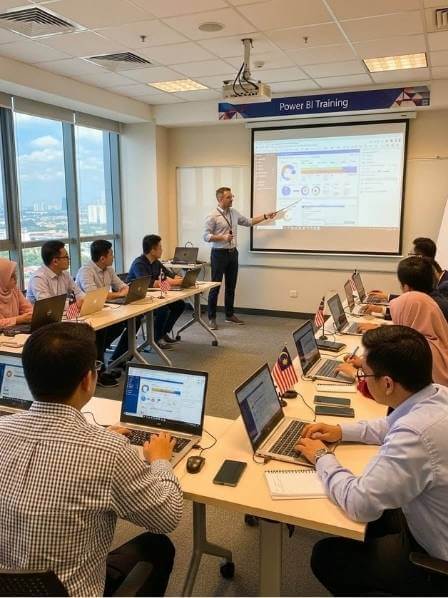
Microsoft Power BI Desktop Essentials Training

Overview

Master Data-Driven Decision Making with Power BI

In today’s business landscape, data is your most valuable asset—if you can understand it. This intensive 2-day Microsoft Power BI Training Course is designed to turn complex data into clear, actionable intelligence. Power BI Desktop is the leading tool for Business Intelligence (BI) and data visualization, allowing professionals to connect, model, and visualize data from any source without deep technical expertise.

This course takes you from foundational concepts to creating interactive, executive-ready dashboards, empowering you to tell compelling stories with data and drive strategic decisions.
Power BI Training Course

Why This Power BI Training is Essential for Your Career & Organization

Moving from spreadsheets to dynamic BI is no longer optional. This training is critical because:

  • Close the Skills Gap: There is a high market demand for Power BI skills.

  • Democratize Data: Enable teams to self-serve insights, reducing dependency on IT.

  • Increase ROI on Data: Unlock the value hidden in your existing data systems.

  • Standardize Reporting: Create a single source of truth with consistent, refreshable reports.

What You Will Achieve

By the end of this hands-on Power BI course, you will be able to:

  • Confidently navigate and utilize Power BI Desktop interface.

  • Connect to various data sources and perform essential data transformation.

  • Design a wide array of impactful visualizations from basic charts to advanced maps.

  • Build interactive dashboards with slicers, filters, and bookmarks for user-driven exploration.

  • Apply best practices in dashboard design for clarity and effectiveness.

  • Publish and share insights via the Power BI Service.

💡Tips: To build robust reports in Power BI, clean data is essential. We recommend pairing this training with our Microsoft Power Query Training to master data import, transformation, and preparation—the critical first step in any BI workflow.

Key Topics Covered

Our curriculum is structured to build competency logically:

  • Module 1: Power BI Desktop Foundation – Installation, Core Concepts

  • Module 2-5: Visualization Mastery – Basic Charts, Maps, Tables, Matrices, Advanced Charts (Waterfall, Treemap, Scatter)

  • Module 6-7: Interactivity & Navigation – Cards, Filters, Slicers

  • Module 8-9: Advanced Dashboard Design – Animated Charts, Objects, Actions, Hyperlinks

  • Module 10: Sharing Insights – Introduction to Power BI Service for Publishing & Sharing

Practical Benefits & Daily Use Cases for Employees

Employees will immediately apply skills to:

  • Sales Teams: Track real-time performance vs. targets with interactive dashboards.

  • Marketing: Visualize campaign ROI and customer engagement funnels.

  • Finance & Operations: Create monthly P&L and operational efficiency reports automatically.

  • Managers: Develop KPI dashboards for their team or department for quick performance reviews.

  • Analysts: Replace static PowerPoint reports with live, drillable Power BI reports.

Coming from Excel? If you’re already proficient with PivotTables and charts, this course is your natural next step. Build on your skills from our Mastering Excel Data Analysis & Visualization course to create interactive, enterprise-level dashboards. ”
“End-to-End Solution: For teams looking to automate data collection, consider our Microsoft Power Apps Training to create data-gathering apps that feed directly into your Power BI reports.

Hands-On Training Methodology

This is not a lecture-based course. We employ a learn-by-doing methodology:

  • Instructor-Led Live Demos: Step-by-step guidance on each feature.

  • Guided Practical Exercises: Apply each concept immediately with provided datasets.

  • Real-World Business Scenario: Build a comprehensive dashboard from scratch across the two days.

  • Q&A and Troubleshooting: Direct feedback and best practice tips from an expert instructor.

Related Training & Learning Paths

Complete Your Data Skills Toolkit:

Ready to Master Power BI and Transform Data Into Decisions?

Empower your team with actionable insights. After this 2-day Power BI training, your employees will confidently build interactive dashboards, automate reports, and drive data-driven decisions—turning raw information into a competitive advantage.

Click Here to Inquire Now or email us at sa***@************om.my to schedule your in-house training and book our HRDC Accredited Trainer and Microsoft Office Specialist.


Level

Intermediate - Advance

Duration

Languange

B. Malaysia and English

Training Mode

Public & In-House

Training Module Content

  • 1.0 Getting Started with Power BI Desktop: What & Why of Power BI, Installation.

  • 2.0 Building Core Visualizations: Column, Bar, Pie, Donut, Funnel, Ribbon Charts.

  • 3.0 Geographic Visualization: Maps, Filled Maps, Formatting, Backgrounds.

  • 4.0 Detailed Reporting with Tables & Matrices: Conditional Formatting, Hierarchies, Subtotals.

  • 5.0 Advanced Analytical Charts: Line/Area/Waterfall Charts, Scatter Plots, Treemaps, Gauges.

  • 6.0 & 7.0 Interactivity with Cards, Filters & Slicers: Apply filters at Visual, Page, Report levels; Text, Date, and Number Slicers.

  • 8.0 Advanced Charts for Storytelling: Animated Bar Race, Drill Down Charts, Sankey, Histogram.

  • 9.0 Dashboard Design & Navigation: Adding Images/Shapes/Buttons, Bookmarking for Navigation.

  • 10.0 Sharing Insights with Power BI Service: Publishing Reports, Creating Dashboards, Exporting to PPT/PDF.

Learning outcome

Participants will leave with:

  • complete, live dashboard project for their portfolio.

  • The ability to transform raw data into an interactive visual story.

  • The confidence to automate and enhance existing reporting processes.

  • Foundational knowledge to pursue further Microsoft Power BI certification paths.

Want to train your entire team?

Get a customized in-house training quote today! Contact us or click below.

Who is this training for?

This course is ideal for: Business Analysts, Data Analysts, Financial Analysts, Marketing Analysts, Operations Managers, Reporting Specialists, and any professional who needs to create reports or make decisions based on data. No prior Power BI experience is required.

Target Industries

Virtually all sectors benefit, including: Financial Services, Retail & E-commerce, Manufacturing & Logistics, Healthcare, Professional Services, Technology, and Government.

Participants requirements:

Pen, Notes & laptops/notebook.

Recognized training provider

Trusted By

Since 2009, we have work with more than 3,000 brands including…

Halal awareness training a training course based on the MPPHM 2022

Clients' Review

This course excelled in transforming data complexity into clarity. The hands-on sessions on data modeling, DAX formulas, and dashboard creation were immediately applicable. I can now build interactive reports from scratch that provide real business insights, not just static charts. A highly practical and empowering skill upgrade.”

Sarah Tan | Business Analyst, Global Logistics Sdn Bhd

“Beyond the fundamentals, the trainer’s deep expertise in Power Query and advanced DAX unlocked next-level automation for our reporting. Learning to efficiently blend data sources and create dynamic measures has saved our team hours of manual work each week. The course structure perfectly balanced core concepts with powerful, time-saving techniques.

Ahmad Fikri | Financial Planning Manager

TRAINER PROFILE

MR. NIK KHAIDIR | Microsoft EXCEL SPECIALIST

Mr. Nik Khaidir Zawawi | MS Excel Specialist

Emerges as a distinguished Microsoft Office Specialist in Excel, with a foundation built on over seven years of targeted training and an expansive eight-year career in engineering. His professional journey is adorned with the development of Smart Data Systems that have transformed the efficiency and productivity landscapes for a myriad of sectors within Malaysia, engaging deeply with both Corporate entities and Government agencies.

Nik’s profound command over Excel is matched by his adeptness in solving complex problems and optimizing digital workflows, integrating cutting-edge cloud technologies to offer unparalleled service. This exceptional blend of technical prowess, visionary outlook, and hands-on project development positions him as an invaluable asset for organizations poised at the forefront of data management innovation.

His dedication to excellence and continuous learning has made him not just a trainer but a mentor, inspiring a new generation of professionals to harness the power of Excel in navigating the challenges of the digital era. Nik’s workshops are not mere training sessions; they are transformative experiences that equip participants with the tools, strategies, and insights to excel in their respective fields, making him the ideal leader for any team looking to elevate their data handling capabilities to new heights.

TRAINING POLICY

Disclaimer

Course dates displayed in the ABTS-TMS™ are provisional, pending final confirmation based on trainer availability. Final dates will be confirmed once coordination with the trainer is complete. You are also welcome to contact our team directly, and we will gladly assist in aligning with the trainer’s schedule.

Cancellation & Rescheduling Policy

We reserve the right to cancel or reschedule any course due to unforeseen circumstances; in such an event, participants will receive a full refund. Please note that the training venue may be subject to change based on final enrollment and classroom availability. All courses require a minimum of five (5) confirmed participants to proceed as scheduled.

Frequently Ask Question (FAQ's)

No results found.